
5 min read
Setting Up Your Profile
Complete your profile to build trust and maintain brand consistency.
5 min setup
Why Your Profile Matters
Your profile information and branding settings power your entire platform presence—from your website header and branding colors to listing post graphics and email signatures. Complete it once, and Orchestate automatically applies your brand identity across all touchpoints.
0:29
Profile Setup Walkthrough
Follow along as we complete a profile from start to finish.
Audio included
Access Your Profile
orchestate.ca/settings
Account Settings
Manage your profile and social media accounts
Profile Setup
Manage your profile, branding, and website configuration.
Setup
Complete your profile
Profile
Social
Branding
Website
Profile
Complete your professional information
PERSONAL INFORMATION
First Name
John
Last Name
Doe
john@example.com
Phone
(416) 555-0123
Brokerage
RE/MAX Success Realty
SERVICE LOCATIONS
Service Areas
Toronto, Halton, Peel
Select the areas where you provide services
Service Cities
Toronto, Oakville, Mississauga
Select the cities where you provide services (3/8 max)
ABOUT
Profile Description
Licensed Realtor for 8 years in Toronto/GTA. Expert in luxury condos, investments, first-time buyers...
Used to personalize and improve your AI-generated content
Try Example
142/500
Save & Continue
Click the "Profile Setup" button in Settings to open the onboarding modal with 4 steps
Fill Required Fields
Full Name
RequiredSarah Johnson
sarah@remax-success.ca
Phone
Required(555) 123-4567
Brokerage
RequiredRE/MAX Success Realty
Service Locations
Website HeaderDisplayed in your website header to showcase your niche local expertise
Service Areas
Toronto, Halton, Peel
Service Cities
Toronto, Oakville, Mississauga, Milton
Bio
Website HeroBrief professional description (150 characters max) - featured in your website's Hero Section and used to personalize AI-generated content
Social Account Setup
Connect Your Social Media Pages
Link your social media pages for seamless posting and engagement tracking
X
For detailed setup instructions, visit the Social Media Accounts Wiki page
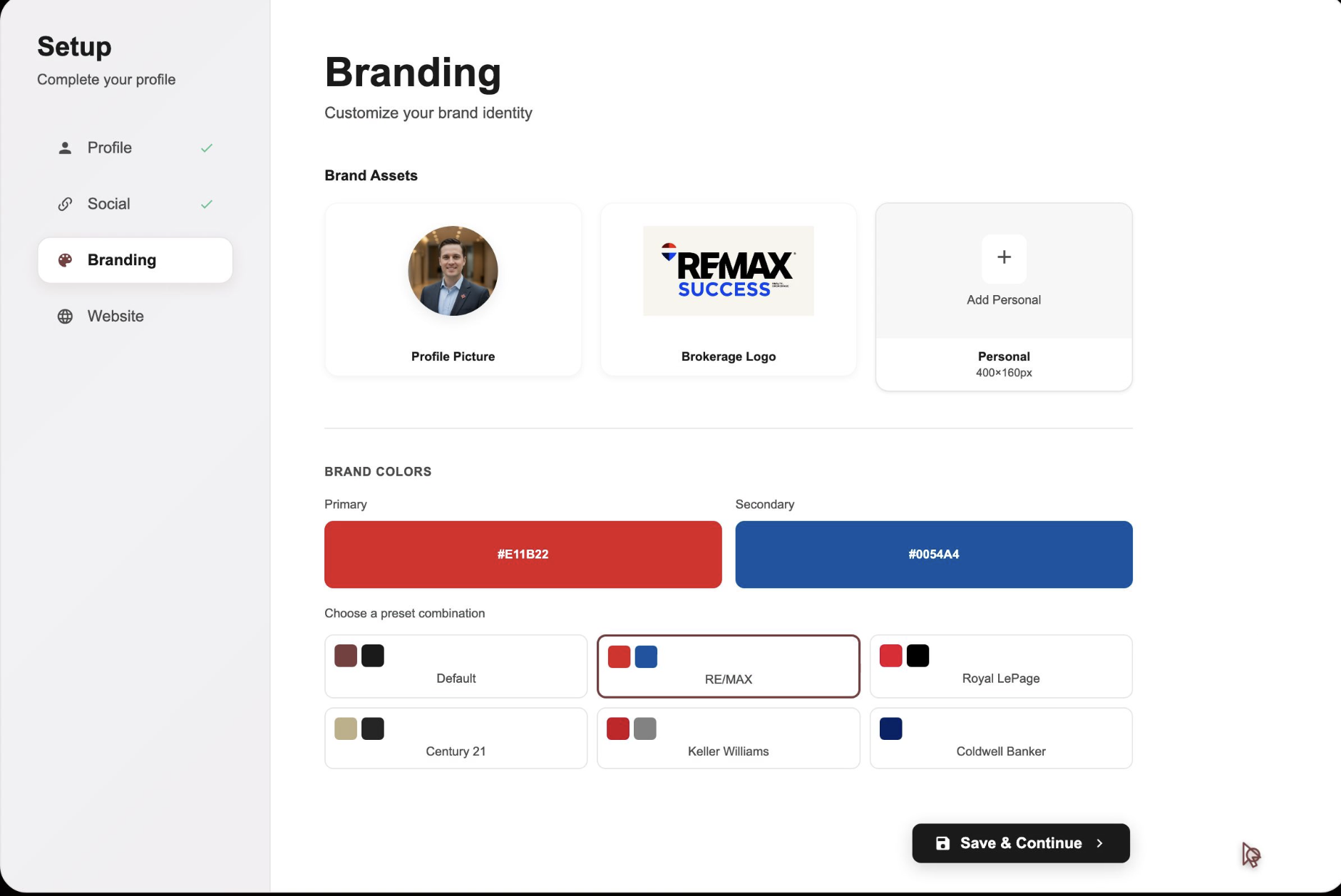
Branding Setup
Brand Assets
Profile Picture
Professional headshot
Website header & listing posts
400×400px
Max 2MB
JPEG/PNG
Brokerage Logo
Company logo
Listing posts & website header
400×160px
Max 1MB
JPEG/PNG
Personal Logo
Personal brand
Optional for listing posts
400×160px
Max 1MB
JPEG/PNG
Brand Colors
Used for website design and listing post graphics
Primary Color
Headers & Buttons
Used in headers, buttons, and key elements
Secondary Color
Accents & Highlights
Accents and highlights throughout
Popular Brokerage Presets
RE/MAX
Royal LePage
Century 21
Keller Williams
Coldwell Banker
eXp Realty
Note
Don't have brand colors? Use your brokerage colors or pick from our curated palettes (RE/MAX, Royal LePage, Century 21, and more) designed for real estate professionals.
Website Domain Setup
Required for Website Initialization
Your website will not be created until you set up your subdomain. This is your unique web address where clients will find your branded IDX website with live MLS listings.
Orchestate Subdomain
Quick setup with instant SSL certificate
Your Subdomain Format
your-name
.orchestate.ca
Example: sarah-johnson.orchestate.ca
Subdomain Requirements
Minimum 3 characters
Lowercase letters and numbers only
Hyphens allowed (not at start or end)
Must be unique (availability checked in real-time)
Custom domains (yourname.com) with SSL will be available soon
Success
Pro Tip: Choose a professional subdomain that's easy to remember and share with clients. We recommend using your full name (e.g., john-smith) or your business name for best brand recognition.
Don't forget to save!
Click Save Profile at the bottom. Changes sync across all platforms within minutes.

The all-in-one marketing platform built for real estate professionals across the Greater Toronto Area — Toronto, Mississauga, Brampton, Burlington, and Milton.
© 2026 Orchestate. All rights reserved.
Made with ❤️ for real estate professionals